
How Do I Record/Complete a Session?
Have you completed your session and need to record your session duration?
Mentors are responsible for formally marking a session as complete on the Vygo platform and this functionality is unavailable to mentees.
If a mentor fails to do so, that session will remain in our system as incomplete.
Post-session Feedback
Depending on your programme, customised feedback may be collected after each session.
Marking a session as complete
Only the mentor can mark a session as complete.
To do this:
- Navigate to your booked session.
- Click the three dots next to the session.
- Select “Mark complete.”
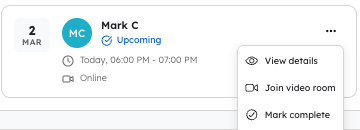
Once the session is marked as complete, the post-session feedback form is automatically triggered.
Member feedback process
After completion, members will be asked to:
- Provide an overall star rating (out of 5).
- Respond to any additional feedback questions set up by the programme administrator.
For example, you may be asked:
- How well did your supporter understand the topic and your problem?
- How well was your supporter able to communicate information about the topic?
- How confident are you with the topic after your session(s) with your supporter?
You may also have the option to provide additional written feedback if there is anything further you would like to share.
Important to note
This feedback process applies to any session booked through the Vygo platform where post-session feedback has been enabled by the programme.
Your feedback helps us continuously improve the experience for both mentors and members.